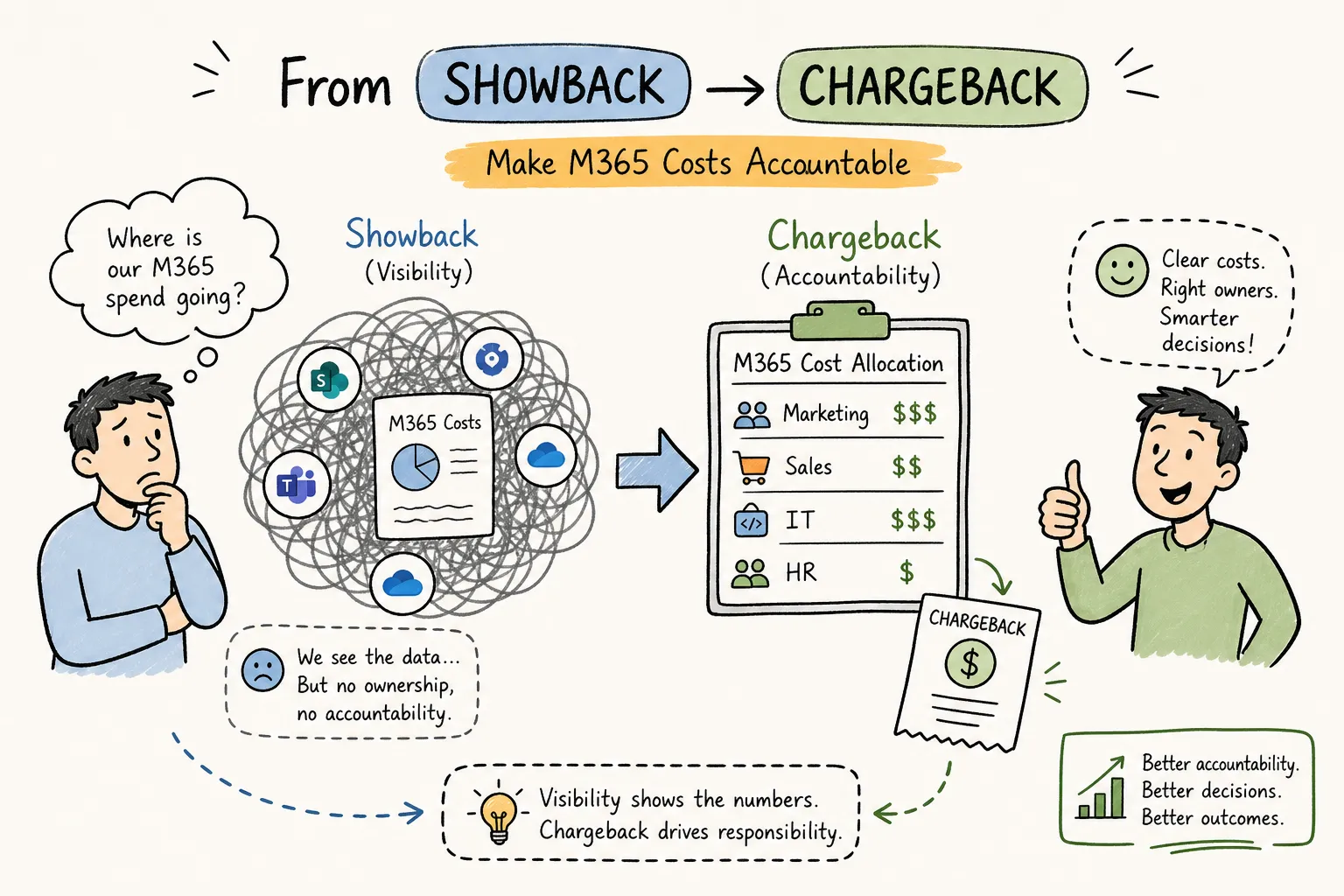
M365 cost accountability is breaking down in most organizations, and the pattern is familiar: your Microsoft 365 bill keeps climbing, but when the CFO asks who’s responsible for the overrun, every hand points somewhere else. IT owns the tenant. Finance owns the budget. Nobody owns the consumption. That gap is where roughly 32% of M365 budgets quietly disappear every year through inactive accounts, overlapping SKUs, and idle seats that no one thought to reclaim.
This guide gives you a structured way to close that gap. You’ll learn how to choose the right cost accountability model, assign ownership across cost domains without triggering turf wars, and get the per-user data that makes accountability real rather than aspirational. The framework is replicable across organizations of any size, and the payoff benchmarks hold consistently: 15, 30% of annual M365 spend.
Why M365 cost accountability breaks down at scale
Most organizations treat Microsoft licensing as a fixed line item: reviewed once at EA renewal, approved by finance, and then forgotten for the next 12 months. That treatment makes sense for a utility bill. It doesn’t make sense for a consumption-based service where headcount changes, departments expand, and new add-ons get approved without anyone tracking the cumulative cost. Without continuous visibility, teams consume licenses freely because there are no signals tied to individual usage and no consequences for over-provisioning.
The structural failure is an ownership vacuum. IT manages the tenant. Finance manages the budget. But when a department gets a surprise chargeback at the end of the quarter, they dispute it, and the dispute lands in a gray zone where nobody has clear authority. The fundamental problem isn’t bad data or bad intentions. It’s that governance without defined ownership is just reporting theater. Fixing cost accountability for M365 requires a structural framework with named owners, agreed rules, and data that’s specific enough to be defensible.
Showback vs. chargeback: choosing the model that fits where you are
Showback and chargeback both allocate M365 costs to the teams consuming them. The difference is whether money actually moves. Showback reports attributable costs to the consuming team but keeps the expense on the central IT or corporate budget. Chargeback posts the cost directly to the consuming department’s P&L or internal invoice. That single distinction changes the behavior you get.
Showback builds awareness without friction. It’s the right starting point when you don’t yet have reliable attribution data or a finance workflow to process internal transfers. You can report each department’s license consumption and estimated cost, validate that the numbers are accurate, and establish cost literacy before you ask anyone to accept budget ownership. The practical limit is that showback rarely changes behavior on its own. Because the spend stays centralized, teams have little reason to optimize.
Chargeback shifts that dynamic entirely. When usage affects a department’s own budget, it becomes a business decision instead of an IT concern. The caveat is readiness: you need clean ownership mapping, high confidence in attribution accuracy, and a finance workflow that can process the allocations. Disputes spike when data quality is shaky, which is exactly why getting the data right before flipping to chargeback matters more than moving fast.
The practical progression most organizations follow is a two-phase model. Start with showback to validate data, assign provisional owners, and let department heads build familiarity with their actual consumption. Move to chargeback once they trust the numbers and finance has the allocation workflow ready. With good tooling in place, this transition can happen within a single budget cycle rather than stretching across years.
Assigning cost ownership without triggering turf wars
The most common mistake in M365 cost governance is splitting accountability. When two teams share responsibility for a cost domain, disputes default to inaction. Every domain needs one Accountable owner who can actually change the behavior driving the spend, not just receive a report about it. A RACI matrix makes this explicit and gives you a reference point when ownership questions come up later.
The four domains worth assigning first cover roughly 80% of addressable waste:
- Tenant-wide licensing strategy: Accountable to the CIO or IT Director, with the M365 platform team responsible for execution and finance consulted on budget impact.
- Departmental license allocation: Accountable to the department leader, with operations or the app owner responsible for day-to-day management.
- Teams and SharePoint storage growth: Accountable to the M365 service owner, with collaboration admins responsible and records or compliance consulted.
- Chargeback and showback rules: Accountable to the Finance or FinOps partner, with IT responsible for generating the underlying data.
The resistance point you’ll hit most often is department heads pushing back with “I didn’t ask for these licenses.” That pushback is legitimate when allocation rules weren’t established in advance. The fix is straightforward: negotiate written allocation agreements before launching chargeback, not after. Budget owners cooperate when they’ve signed off on the rules, and they dispute when they receive a surprise invoice. Frame the conversation as finance governance, not IT enforcement, and you’ll reach agreement faster.
The data layer your M365 cost accountability model depends on
Native Microsoft 365 admin center reports show you assigned license counts and sign-in activity. Those are useful starting points, but they’re not sufficient to hold anyone accountable at the department level. A user who signed in once last quarter doesn’t tell you whether they’ve used Teams calling, eDiscovery, advanced compliance features, or any of the capabilities bundled in their E5 license. Sign-in activity proves access; it doesn’t prove justification. Feature-level usage data is what tells you whether the license is actually earning its cost.
A finance-ready cost allocation report requires four things: each user mapped to their department, their assigned SKUs with per-seat cost, their actual feature usage signals across every M365 service, and an annualized waste figure that a budget owner can either accept or dispute with confidence. Without all four, your showback is directional at best and your chargeback is guessable, not defensible.
Replacing the spreadsheet marathon with automated tooling
This is where automated tooling replaces the spreadsheet marathon. Chronom AI connects to your M365 tenant via a read-only Microsoft Graph API scan that makes no changes to your environment. Within 48 hours it delivers per-user, per-SKU cost attribution with feature-level usage signals across 40+ waste patterns, giving finance numbers they can allocate by department and IT a prioritized action list that doesn’t require a multi-week manual data pull to produce.
Because Chronom AI is SOC 2 compliant with a zero-change-until-approved architecture, IT can run the initial scan without a lengthy security review or a drawn-out implementation project. Budget owners get the specifics they need to accept or dispute accountability with confidence rather than guesswork.
Turning visibility into department-level action
Per-user data is only useful if it reaches the people who control the spend. Once you have a clean baseline, connect each waste category to the team that actually drives it. Inactive accounts belong to HR and IT offboarding. Overprovisioned E5 licenses belong to the department that requested them. Idle Copilot seats belong to whoever approved the rollout. Structuring the findings handoff this way means budget owners receive a targeted list of their own team’s waste instead of a company-wide dump they have no incentive to act on.
The optimization actions with the fastest payback are also the most straightforward. Removing licenses from inactive or departed users recovers cost immediately with no service disruption. Downgrading users from E5 to E3 when they don’t consume advanced features like eDiscovery or advanced compliance captures significant per-seat savings across large user populations. Reclaiming idle Copilot seats at roughly $30 per user per month adds up fast in organizations where rollout outpaced adoption. Recovering SharePoint storage overages prevents ongoing quota charges that few finance teams even know they’re paying.
The benchmarks hold consistently across company sizes. A structured optimization program typically delivers 15, 20% savings on annual M365 spend. Organizations that combine license rightsizing with lifecycle automation and continuous monitoring push that figure toward 25, 30%. For a 1,000-seat organization, that’s the difference between a meaningful one-time saving and a sustained six-figure reduction that compounds each renewal cycle.
Keeping M365 cost accountability alive between renewal cycles
A one-time audit produces a one-time win. Without ongoing monitoring, license drift restores most of the waste within 6, 12 months. New hires get over-provisioned by default. Departing employees aren’t offboarded cleanly. Approved add-ons expand without review. The accountability culture you built during the initial cleanup erodes because the data feeding your showback or chargeback model goes stale between reporting cycles.
A continuous governance rhythm prevents this. Monthly or quarterly cost reports pushed to department heads maintain awareness between renewals. Triggered alerts when anomalies spike, such as new Copilot seats added without approval or storage thresholds crossed, catch drift before it compounds. An annual RACI review timed to the EA renewal cycle keeps ownership assignments current as organizations restructure and responsibilities shift. With this cadence in place, cloud cost accountability for M365 stops being a project that runs before renewal and becomes a standard operating practice that runs year-round.
The organizations that sustain savings year over year are the ones that automate the data layer rather than re-run manual reviews each cycle. Chronom AI’s 24/7 anomaly detection monitors your tenant continuously so waste doesn’t quietly rebuild after each cleanup. The savings you realize this cycle don’t have to be re-discovered next cycle.
M365 cost accountability framework that makes savings stick
M365 cost accountability isn’t a reporting problem. It’s an ownership problem with a data dependency. When you assign one accountable party per cost domain, choose the right showback-to-chargeback progression, and give finance and IT access to per-user, per-SKU visibility they can actually defend, the savings follow. The benchmarks are real: 15, 30% of annual spend is consistently achievable, and the Microsoft 365 chargeback model is replicable regardless of company size or current governance maturity.
The fastest way to start is with a clean data baseline that names the waste, the user, and the dollar figure. Chronom AI’s free audit delivers that baseline within 48 hours using a read-only scan that requires no internal IT bandwidth and no lengthy implementation. Once you can see exactly what’s being wasted, who’s consuming it, and what it costs annually, every part of this framework becomes actionable rather than aspirational. Accountability begins the moment the numbers are specific enough to act on.